
The published sheet, in full
Every row Valve carries for App ID 2001760, read on 12 August 2026. Three of them are identical across both tiers and are usually dropped when the specs get reprinted — including the one that is not negotiable: an SSD is required rather than recommended, at both tiers.
| Minimum — low 1080p, 40 fps | Recommended — medium 1080p, 60 fps | |
|---|---|---|
| OS | Windows 10 / 11, 64-bit | Windows 11, 64-bit |
| CPU | Core i5-8400 / Ryzen 5 3600 | Core i7-12700K / Ryzen 7 5800X |
| GPU | GTX 1070 8 GB / RX 580 8 GB | RTX 3060 12 GB / RX 6700 XT 12 GB |
| RAM | 16 GB | 16 GB |
| DirectX | Version 12 | Version 12 |
| Storage | 45 GB | 45 GB |
| Drive | SSD required | SSD required |
OS
- Minimum — low 1080p, 40 fps
- Windows 10 / 11, 64-bit
- Recommended — medium 1080p, 60 fps
- Windows 11, 64-bit
CPU
- Minimum — low 1080p, 40 fps
- Core i5-8400 / Ryzen 5 3600
- Recommended — medium 1080p, 60 fps
- Core i7-12700K / Ryzen 7 5800X
GPU
- Minimum — low 1080p, 40 fps
- GTX 1070 8 GB / RX 580 8 GB
- Recommended — medium 1080p, 60 fps
- RTX 3060 12 GB / RX 6700 XT 12 GB
RAM
- Minimum — low 1080p, 40 fps
- 16 GB
- Recommended — medium 1080p, 60 fps
- 16 GB
DirectX
- Minimum — low 1080p, 40 fps
- Version 12
- Recommended — medium 1080p, 60 fps
- Version 12
Storage
- Minimum — low 1080p, 40 fps
- 45 GB
- Recommended — medium 1080p, 60 fps
- 45 GB
Drive
- Minimum — low 1080p, 40 fps
- SSD required
- Recommended — medium 1080p, 60 fps
- SSD required
Both tiers assume the upscaler is in Performance mode — and that word is always dropped
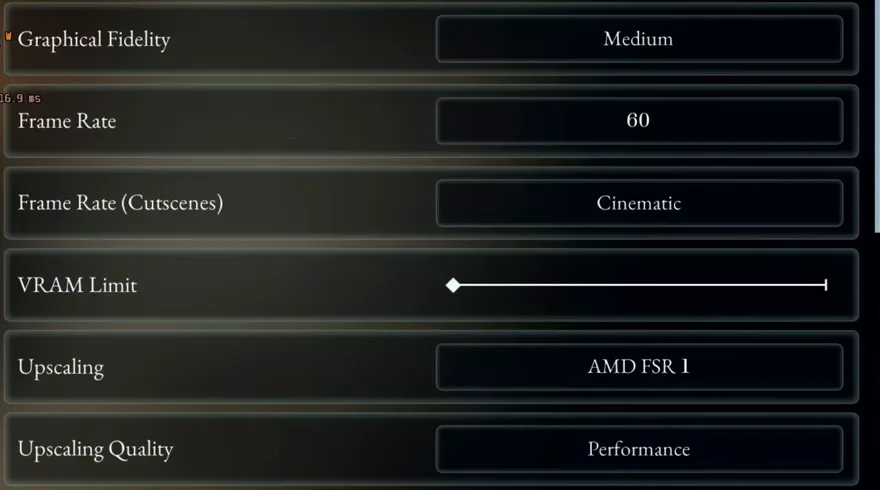
The publisher’s own footnote for the recommended tier reads “Med 1080p @ 60fps w/ DLSS or FSR3 (Performance)”. Performance mode halves both axes before upscaling, so the 1080p in that sentence is 960×540 in the engine — a quarter of the pixels, reconstructed. Every reprint of these specs keeps the resolution and drops the bracket, and the bracket is the difference between the recommended tier being comfortable and being the floor. It is also why an independent benchmark concluded the recommended tier is overstated while the store page looked generous: the two readings are of the same sentence with and without its last word. The game agrees with the footnote, which is the part that makes this checkable rather than an inference — a first launch lands on Upscaling Quality: Performance, on its own, as the frame below shows.
The minimum tier names a card that cannot run the upscaler its own footnote asks for
The minimum footnote reads “Low 1080p @ 40fps w/ DLSS (RTX 20-50 Series) or FSR1 (Performance)”, and the minimum GPU on the same row is a GTX 1070. DLSS needs hardware that arrived with the RTX 20 series — the footnote says so in its own bracket — so a 1070 is on the FSR 1 branch of that sentence and not the DLSS one. This is not a bug in the game and it is not a misprint: it is one line quoting two upscalers where the named card can only reach the weaker of them. FSR 1 has no temporal data to work from, and it is also what this game selects on a first launch, on every machine, which is measured separately below.
What has actually been measured, and on what
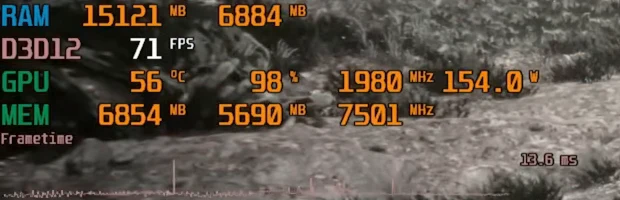
Four named configurations from the one PC benchmark that tests native rendering against the published sheet: an RTX 3060 with a Ryzen 5 5600X holding roughly 60 fps at native 1080p medium and nearer 70 with DLSS Quality; an RTX 5060 Ti with a 9800X3D at 90–100 fps at 1440p highest with ray tracing and DLSS Quality; and an RX 9070 XT in the mid-70s at 4K highest with FSR Quality. The 3060 figure is the one worth sitting with, because it is the recommended card hitting the recommended target — at native, without the Performance-mode upscaling the sheet assumed. That the run needed no upscaling to clear it is also the second independent reading of the footnote above: the tester’s own chapter for it is titled “PC System Requirements said DLSS P to hit 1080p 60 at med”, which is the same sentence read the same way by someone who had not read this page. Nobody on this site has run this game on any card; every figure here is Daniel Owen’s and is dated 4 August 2026.

What each setting actually costs
Measured individually rather than as presets, which is what makes them usable — you can build your own budget instead of accepting someone else’s.
| Setting | Measured cost | Recommended |
|---|---|---|
| Ray tracing | 2% in a quiet scene, up to 7% elsewhere, for a barely visible difference | Off |
| Texture quality | Controls asset quality; little effect on VRAM | 3/3 |
| VRAM limit | This is what drives VRAM use. 2/2 pushed close to the 8 GB ceiling on a 3060 Ti | 1/2 on an 8 GB card |
| Mesh quality | Geometry LOD, mostly foliage. ~3% low to high, ~6% to highest | High |
| Shadow resolution | One of the most expensive: 8% at high, up to 14% in some scenes | Medium |
| Shadow quality | Shadow filtering. No significant cost | High or highest |
| Lighting | Volumetric lighting. Medium and above look the same; highest costs 17% | Medium |
Ray tracing
- Measured cost
- 2% in a quiet scene, up to 7% elsewhere, for a barely visible difference
- Recommended
- Off
Texture quality
- Measured cost
- Controls asset quality; little effect on VRAM
- Recommended
- 3/3
VRAM limit
- Measured cost
- This is what drives VRAM use. 2/2 pushed close to the 8 GB ceiling on a 3060 Ti
- Recommended
- 1/2 on an 8 GB card
Mesh quality
- Measured cost
- Geometry LOD, mostly foliage. ~3% low to high, ~6% to highest
- Recommended
- High
Shadow resolution
- Measured cost
- One of the most expensive: 8% at high, up to 14% in some scenes
- Recommended
- Medium
Shadow quality
- Measured cost
- Shadow filtering. No significant cost
- Recommended
- High or highest
Lighting
- Measured cost
- Volumetric lighting. Medium and above look the same; highest costs 17%
- Recommended
- Medium
What it adds up to
An optimized set ran roughly 27–30% faster than the highest preset at 1440p with upscaling on, for a picture most players would not be able to pick out in motion. The two settings doing most of that work are shadow resolution and lighting.
Texture quality and VRAM limit are not the same setting
This one is worth stating on its own because the names suggest otherwise. Texture quality controls how good the assets look and barely touches VRAM. VRAM limit sizes the texture streaming pool, and that is the one that will exhaust an 8 GB card. On 8 GB, turn textures up and the VRAM limit down.
v1.0.8 added DLSS 4/4.5 and FSR 4, and every measurement above predates it
On 15 August 2026 the second patch implemented DLSS 4/4.5 (L/M) and FSR 4 on PC — an item the previous notes had deferred, and the first change to this game’s upscaler menu since launch. Everything measured on this page was captured before it, on a build whose upscaler options were what shipped in August. Nothing here is retracted, because none of it was a claim about DLSS 4: the FSR 1 first-open finding, the preset-by-preset costs and the optimised set were all measured and all stand as measurements of the build they were taken on. What cannot be carried forward without a re-check is the advice — a menu with two more upscalers in it is a different menu, and “which upscaler to pick” is exactly the question that changed. The re-capture is scheduled and unfinished, and this paragraph is here rather than a silent edit because a settings page that quietly stops matching the settings screen is worse than one that says which build it was taken on.
v1.0.7 changed the cutscene default — and it is not the setting people think
On 9 August 2026 v1.0.7 changed the default from Cinematic to Performance for one specific control, and the publisher’s own support centre names it: Settings → Graphics → “Frame Rate (Cutscenes)”, whose two options read “Cinematic (24 FPS)” and “Performance (same FPS as game settings)”. So this is a cutscene frame-rate cap, not the graphics preset and not the upscaler. Everything measured above is untouched by it, including the finding that a first open still lands on AMD FSR 1 — a patch that moved the graphics preset would have retired that measurement, and this one does not. Existing Cinematic selections also stay Cinematic until you change them, so the patch has not moved a tuned setup. The reason to open the menu after updating is the upscaler, not this.